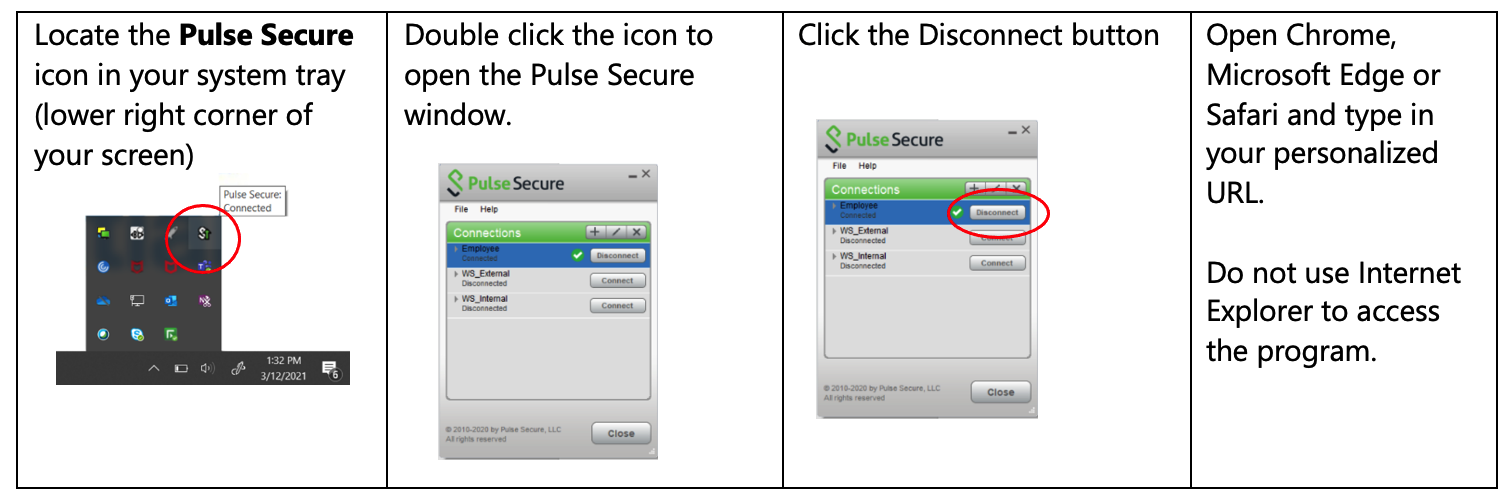
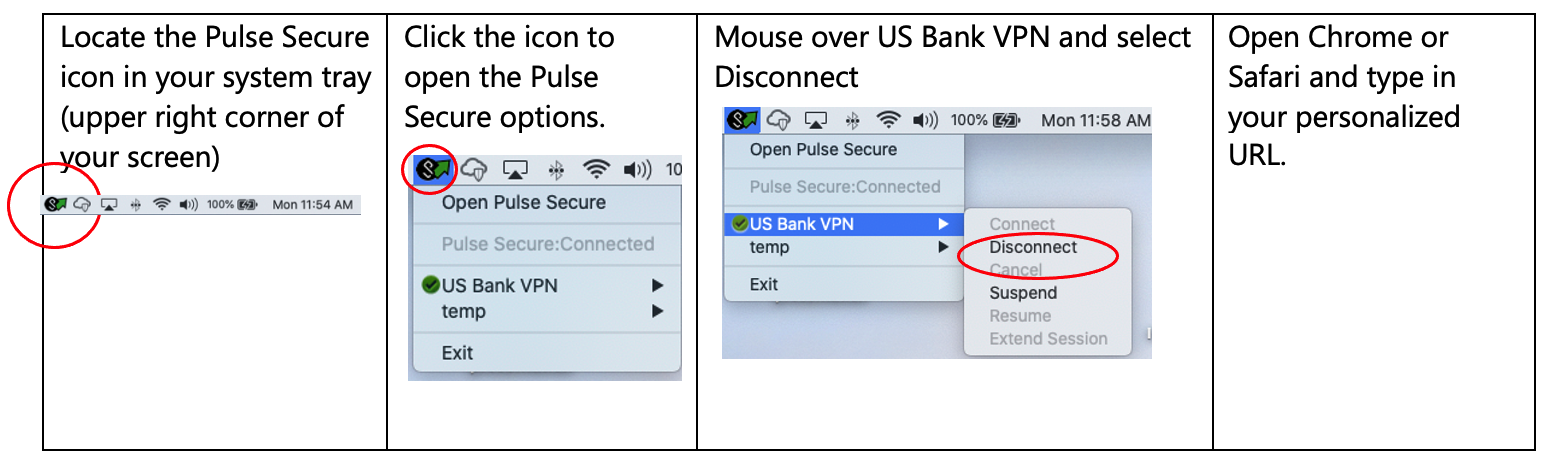
The preference is that you watch the recognition program from a personal device at home, but if you need or prefer to use your U.S. Bank/Elavon computer or device, there are a few additional steps to be able to access the website. If you’re at home using VPN and a corporate-owned device, you’ll need to first disconnect from U.S. Bank/Elavon VPN to access the site during the recognition program.
If you try to access the site beginning one hour prior to the program start time (in your local time zone), you’ll receive an error message directing you to disconnect from VPN. You’ll use the same URL, but you just need to first disconnect from VPN.
Yes. It’s very important to test whatever device you will use to watch the recognition program on May 13, and you should test well in advance to allow for troubleshooting, if needed. If you wait until just before the program starts, you risk the chance of not being able to watch the program, and you’ll miss enjoying it along with your watch party guests. The watch party and chat room will only be active during the original scheduled time.
If you try to access the site from one hour prior to the program start time (in your local time zone) through midnight that evening, you’ll receive an error message directing you to disconnect from VPN. You’ll use the same URL, you just need to first disconnect from VPN.
Visit test.celebratelegends.com and follow the instructions. If you access the test video with no concerns, you should be all set for May 13. While you’re on the test site, the test video will share other tips about what you’ll see and how to navigate the chat room feature or minimize it if you don’t have guests joining you virtually.
If you try to access the site from one hour prior to the program start time (in your local time zone) through midnight that evening, you’ll receive an error message directing you to disconnect from VPN. You’ll use the same URL, you just need to first disconnect from VPN.
No problem. The test link will continue to be available right up until May 13. Just follow the same steps to test another device.
Because of system bandwidth constraints and to ensure everyone has an optimal viewing experience, the bank is limiting access to the Legends Portal the evening of the recognition program. You’ll still be able to use your corporate-owned device at home, but you’ll need to take the added step to disconnect from VPN before you’ll be able to access the site.
If you try to access the site beginning one hour prior to the program start time (in your local time zone), you’ll receive an error message directing you to disconnect from VPN. You’ll use the same URL, but you just need to first disconnect from VPN.
It’s highly recommended you watch the program from home. If you’re onsite at a U.S. Bank/Elavon office or branch and directly connected to the network using a corporate-owned device, you will not be able access the website. If you use a personal device from the office (e.g., smart phone or tablet) you’ll need to connect via your cellular network. You will not be able to use corporate guest Wi-Fi to access the website.